Running WordPress? Here's what I'd do about PHP2Shell today
Should you worry about PHP2Shell? Don't panic, but don't wait either. Here's the half-hour check I'd run on any WordPress site today.
By Ollie Hempsall · 22 October 2026
Web developer and digital marketer based in Derbyshire, helping small businesses get more from their websites.
Short version. On 21 October 2026 the team behind PHP, the software every WordPress site runs on, fixed two serious security flaws now known as PHP2Shell. The good news is that the fix itself is small and routine. The risk is that on thousands of small business websites, nobody applies it. Checking your own site takes about half an hour, costs nothing, and means you'll know rather than hope. Below is exactly what I'd do today if my business website ran on WordPress.
What happened
PHP is the programming language that runs on the web server behind most websites. WordPress is written in it, so every WordPress site depends on it, including sites built with Elementor or WooCommerce.
The two flaws let an attacker run their own code on a website's server without needing to log in. PHP's own security advisory rates both as critical and tells everyone to update immediately. Security firm Wiz, which helped find them, estimates PHP runs around 70% of the world's websites, and SecurityWeek reports that attackers started trying to use them almost straight away.
The important part for business owners is that clicking "update" inside WordPress won't fix this. PHP sits underneath WordPress, on the server, and on most small business websites that server belongs to your hosting company. They have to install the fix.
Should you be worried?
Not panicked, but not relaxed either. The BBC's explainer has the reassuring part. Paul Spain of Gorilla Cyber Security told the BBC that installing the patch is a small, routine fix for most tech teams. If you just visit websites, there's nothing for you to install either, as the responsibility sits with whoever runs each site.
The same article explains why I'd still check today, for three reasons.
Small sites are the ones most at risk. The BBC reports experts warning that poorly maintained websites, particularly those run by smaller organisations without security teams, face greater risk. Big organisations have people patching overnight. Most small businesses don't, so the fix sits waiting for someone to notice it.
The clock is now running. Researcher Salil Kanhere from UNSW Sydney told the BBC to expect more attempts to use the flaws over the coming weeks, because the technical details are now public.
A small business website is worth hacking. It's tempting to think nobody would bother with a local plumber's website. But security firm Island points out that a hacked business site keeps its Google rankings and its customers' trust, which makes it more useful to an attacker than a brand new site, not less.
The big names aren't taking chances. According to the BBC, Wikipedia's parent organisation, the Finnish government, Edinburgh council and the BBC itself all took sites or pages offline as a precaution, along with several Scottish councils and health boards. If they chose caution over staying online, a half-hour check is a reasonable price for your own peace of mind.
What I'd do today, step by step
1. Find out which PHP version your site runs (5 minutes)
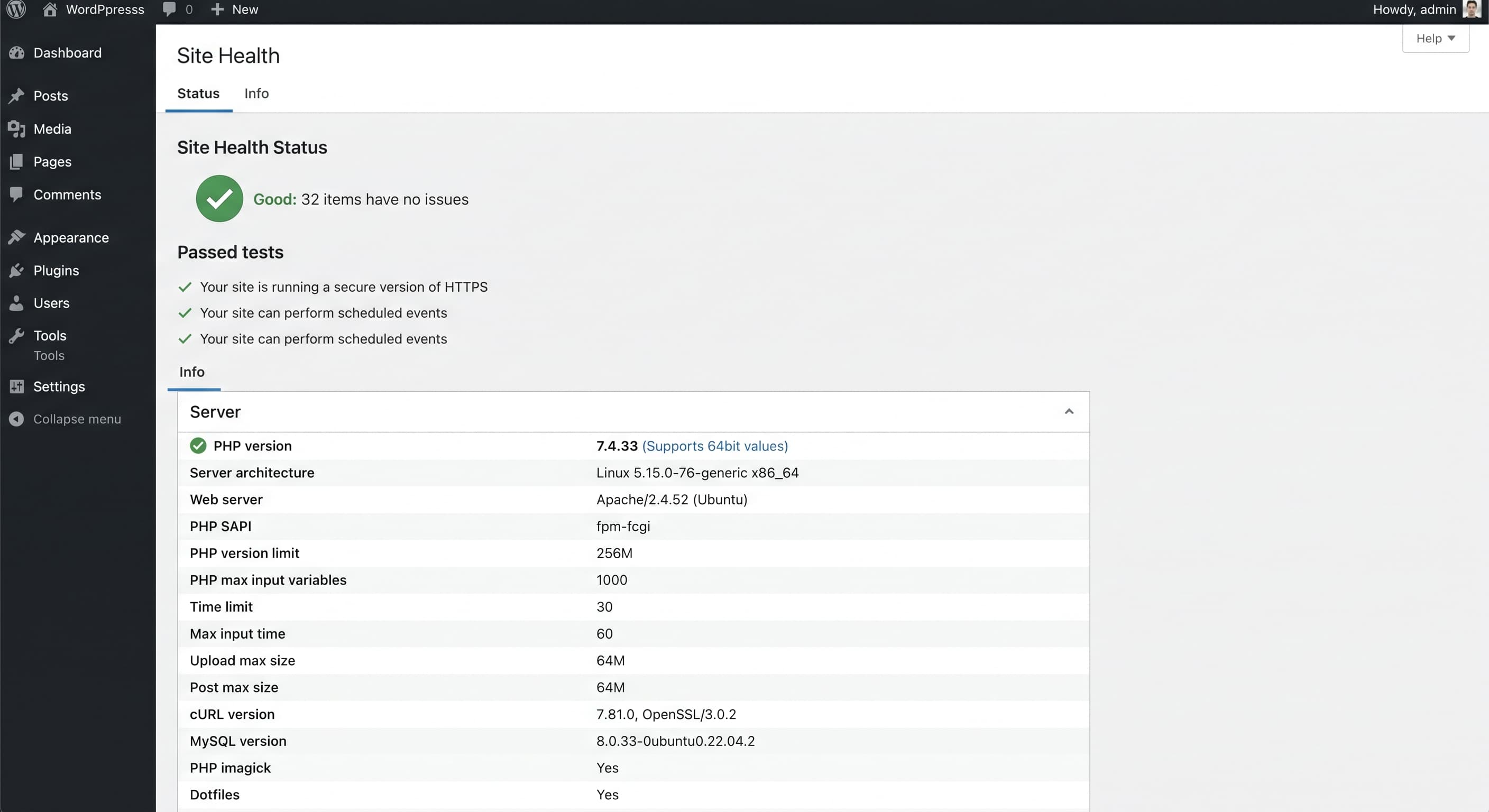
Log in to WordPress and go to Tools, then Site Health, then the Info tab. Open the Server section and look for PHP version. Write the number down.
The fixed versions are PHP 8.5.12, 8.4.27, 8.3.36 and 8.2.35, or anything later on the same branch. One catch. Some hosts install the fix without changing the number you see, so a screen saying "8.3" doesn't tell you whether you're patched. That's what step 2 is for.
2. Email your host (5 minutes)
This is the single most useful thing you can do today. Copy, paste and send.
Hi, please could you confirm three things for my website [your domain]?
- Which exact PHP version is my site running on right now?
- Have you installed the PHP2Shell security fixes released on 21 October 2026, and restarted PHP afterwards?
- If my site is on PHP 8.1 or older, what's the plan to move it to a supported version? Thanks.
Keep the reply. If you ever need to show you took reasonable steps, a written answer from your host is worth having.
3. Plan a move if you're on an old version
PHP 8.1 and older no longer get fixes from the PHP project, according to the advisory. The same page says PHP 8.2 stops getting security fixes after 31 December 2026, so if you're on 8.2, it's worth planning the next upgrade now rather than in another emergency. Most hosts let you switch versions from your hosting dashboard, but test the site afterwards, as older plugins sometimes break on newer PHP.
4. Take a backup you can actually get to (10 minutes)
Make a fresh backup of your site and download a copy to your own computer or cloud storage. A backup that only lives on the same server as your website isn't much help if that server is the thing that gets compromised.
5. Update everything else while you're logged in (5 minutes)
PHP2Shell isn't fixed by WordPress updates, but while you're there, update WordPress, your plugins and your theme, and delete any plugins you don't use. Every plugin is code someone else wrote, and unused ones still need keeping up to date.
One related item from this week. The popular backup plugin UpdraftPlus had a separate security incident, and the company behind it says anyone using its UpdraftCentral feature should update the plugin and delete their UpdraftCentral keys. If you use it, do that today too.
6. Check who can log in (2 minutes)
The UK's National Cyber Security Centre has told organisations to check for backdoors, which are hidden ways back into a site that an attacker leaves behind, as reported by the BBC. A full check is a job for your host or developer, but you can do the quick version yourself.
Go to Users and filter by Administrator. If there's anyone you don't recognise, don't ignore it. Ask your host or developer to look before you delete anything, as an unknown admin account can be a sign the site has already been tampered with. Do the same quick scan of your Plugins list for anything you don't remember installing.
7. If your host can't confirm a fix
Ask whether they can put a web firewall in front of your site in the meantime. Some providers, such as Cloudflare, have added temporary protection, but PHP's advisory is clear that only updating is a complete fix.
If the honest answer is that your site needs to come down for a day or two, ask for a proper "temporarily unavailable" message, known as a 503 status, rather than an error page. Google's guidance says a 503 tells it the break is temporary, so your pages stay in its results, as long as the downtime lasts no more than a few days.
I ran this check on a site I look after this morning. The host had already updated to a safe version, which is what I'd expect from most providers given how widely this has been covered. A host that cannot confirm a patch by now has serious questions to answer.
If you'd rather someone else checked
That's completely understandable. Most business owners have never heard of PHP, and that's fine, it isn't your job. The real problem is when nobody knows whose job it is.
If you're in Derbyshire or the East Midlands and you'd like me to run this check for you, give me a call on 07527 448602 and I'll tell you whether you need to do anything.
For transparency, the websites I build don't run on PHP. They're custom built with a framework called Next.js and hosted on Vercel, so PHP2Shell doesn't apply to them. They are patched for the Next.js security fixes released in October 2026, and keeping them up to date is part of how I look after them.
Frequently asked questions
Is my WordPress site definitely vulnerable? Not definitely, but it is very likely to be affected until your host installs the fix. PHP's advisory says every PHP installation serving web pages is at risk until it's updated.
Will a security plugin protect me? Not fully. A security plugin runs inside WordPress, and this flaw is in the layer underneath. Firewalls that sit in front of your site can help as a stopgap, but PHP's advisory says updating is the only complete fix.
I'm on managed WordPress hosting. Do I need to do anything? Managed hosts usually install fixes themselves, so you're probably fine. It's still worth sending the email in step 2 so you have the answer in writing.
Does this affect Wix, Squarespace or Shopify sites? Those platforms run their own servers and handle this kind of update for you, so there's nothing for you to install. If in doubt, check their status or security pages.
I've had an email about PHP2Shell asking me to log in or click a link. Is it genuine? Be careful. The BBC reports experts warning that scammers will use the publicity around this to send phishing emails. Don't click links in unexpected messages. Log in to your hosting account directly instead.
Should I take my site offline just in case? Not unless your host can't confirm a fix and can't add protection. If it does need to come down, use a 503 "temporarily unavailable" page, as in step 7, so your Google rankings aren't affected.