How I Built a Cookieless Analytics Dashboard From Scratch (And Why I Did It)
Why we built a fully custom, cookieless analytics system instead of using Google Analytics, and the technical hurdles involved in building one.
By Oliver Hempsall · 10 July 2026
Web developer and digital marketer based in the UK, helping small businesses get more from their websites.
When I started building Fludi Leads, one of the first things on my list was analytics. I wanted to understand how visitors were moving through the site, where they were coming from, and whether people were actually engaging with the product. The obvious answer was Google Analytics 4. But the more I looked at it, the less I liked it.
Why I didn't just install Google Analytics
The problem isn't the tool itself, GA4 is powerful. The problem is what it requires: a cookie consent banner, a legal basis for data collection, and the acceptance that a meaningful percentage of visitors will simply decline tracking entirely. Under UK PECR rules, analytics cookies generally require consent, and the ICO's own guidance is unambiguous that pre-ticked boxes, implied consent through continued browsing, or a single tick covering analytics and marketing together don't meet the bar. There's a narrow new exemption for genuinely low-risk statistical purposes that came into force under the Data (Use and Access) Act in February 2026, but it only applies where the technology is used solely for that purpose, and most standard GA4 setups blend analytics with signals that fall outside it, so in practice the consent requirement still applies to almost everyone.
The cost of that consent requirement is bigger than most site owners realise. Depending on audience and banner design, cookie consent decline and non-response can leave anywhere from 30% to 90% of GA4 sessions unrecorded, and in privacy-conscious markets like Germany and France, well under a quarter of visitors typically accept analytics cookies at all. That means a large share of the people actually using your site simply never show up in your reports, not because they left, but because they never consented to being counted.
I decided to build something different: a fully custom, cookieless analytics system that stays PECR-compliant out of the box, collects no personal data, and requires no consent banner at all.
Here is how it works, and the hurdles I ran into along the way.
The core idea: fingerprinting without cookies
Cookies persist between sessions. A cookieless approach means finding a way to distinguish visitors without storing anything in their browser. The technique I used is server-side visitor fingerprinting: combining the visitor's IP address, user agent string, and the current date into a hashed identifier.
The key word there is "date." Because the hash resets every day, the same visitor appears as a new visitor the following morning. This is intentional. It means the system cannot build a profile of any individual over time, and it means the data is genuinely anonymous under UK privacy law, because there is no way to reverse the hash back to a person. No consent required.
All of this happens server-side, in a Next.js middleware layer that intercepts every incoming request before the page loads. Nothing is stored in the browser. No cookies, no localStorage, no fingerprint data sent from the client at all.
Getting duplicate page views under control
The first version of the system had a problem. The data was inflated. Every visit was being logged multiple times, sometimes three or four times for a single page load.
The culprit was Next.js itself. The framework prefetches routes in the background before a visitor actually navigates to them. Each of those prefetch requests was triggering a page view record. I tried filtering by request headers, looking for flags that would identify a prefetch rather than a real visit, but in Next.js 16 those headers aren't reliably sent, so that approach failed.
I then tried a read-then-insert approach: before logging a page view, check whether one already exists for that visitor and path in the last ten seconds, and skip it if so. This looked good in testing. In production it fell apart, because under load multiple requests arrive simultaneously before any of them has finished writing, so the race condition meant duplicates still slipped through.
The solution that actually worked was a Postgres unique index. I added a minute_bucket column to the page views table, storing the current timestamp truncated to the minute, then created a unique constraint across visitor_hash, path, and minute_bucket. Any attempt to insert a duplicate within the same minute is rejected at the database level. The application uses an upsert with ignoreDuplicates: true, so rather than throwing an error, it simply silences the duplicate and moves on. Because the constraint is enforced by the database itself, there is no race condition possible.
Fixing self-referral noise
Once deduplication was working, I noticed something odd in the traffic source breakdown. A significant portion of traffic was being classified as a "referral" from fludileads.co.uk, the site's own domain. This was internal navigation, visitors clicking from one page to another, appearing as external referrals.
The fix was in the middleware layer. Before logging the referrer, the system now compares the referrer's hostname to the current request's hostname. If they match, the referrer is stripped and the visit is classified as direct internal navigation. A small change, but it made the source breakdown meaningfully more accurate.
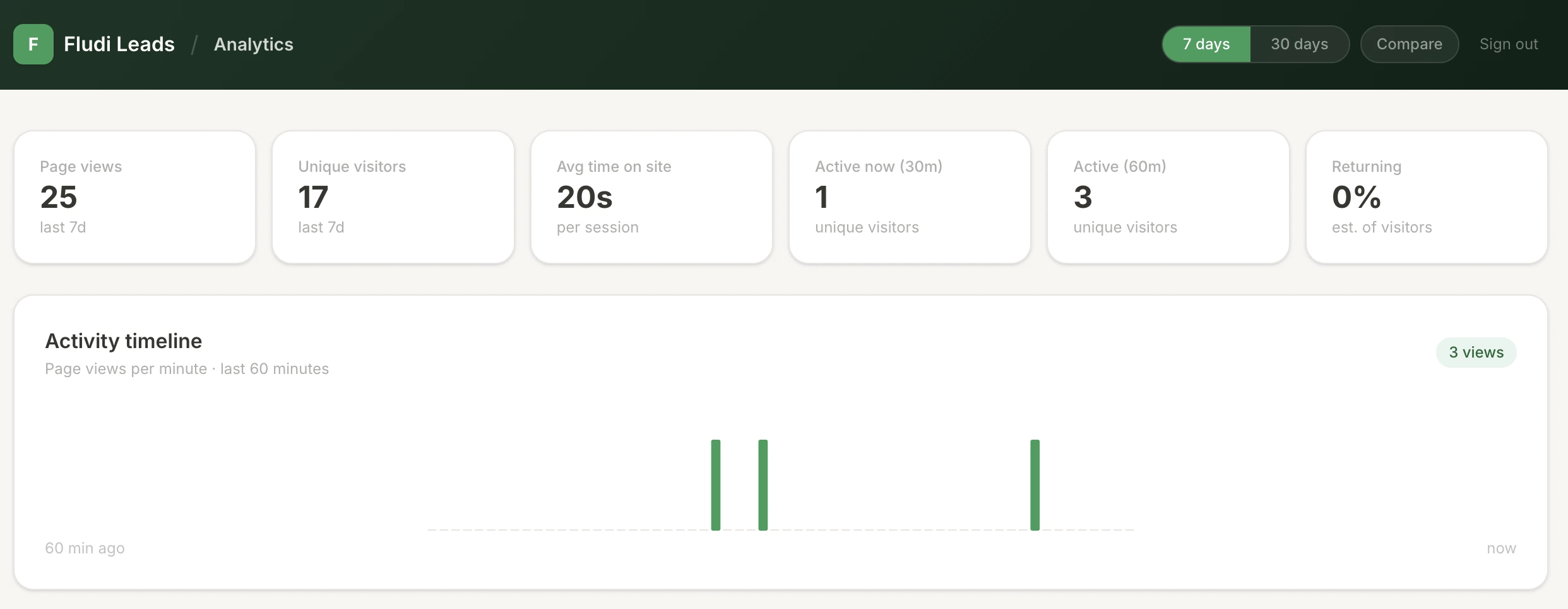
What the dashboard actually shows
The analytics dashboard runs entirely server-side. Because there are no client-side scripts collecting data, page load performance is unaffected. All the aggregation happens at request time in Next.js server components, pulling from a Supabase database that I control entirely.
The dashboard includes:
- A live activity timeline, a bar chart of page views per minute over the last 60 minutes, useful for seeing whether a piece of content is driving a spike in real time
- Traffic source breakdown, classifying visitors by referral source (organic search, direct, social, email, AI assistant), with a UTM medium tab alongside it for campaign-tagged links
- A geographic bubble map, geolocating visitors by IP and plotting them on a world map using an equirectangular SVG projection
- Page journey flow, grouping each visitor's page views into sessions and ranking the most common paths through the site
- AI crawler detection, a separate bot detection layer identifying AI web crawlers such as GPTBot and Anthropic's ClaudeBot, filtered out of the main visitor data but surfaced in their own table showing which crawlers visited and which pages they indexed, which is a useful sanity check on the same AI-visibility question we've written about separately when building websites for AI search
- Period comparison, a toggle to compare the current 7 or 30 day window against the equivalent prior period, with percentage deltas on each headline metric
Why this matters beyond the technical detail
The practical outcome is a site with meaningful analytics data from day one, without asking visitors to consent to tracking and without losing a chunk of that data when they decline.
It's also entirely first-party. The data lives in my own database. No third party has access to it, no script is loaded from an external domain, and there's nothing for an ad blocker or privacy extension to strip out.
For a product like Fludi Leads, where the pitch is built around Google's official Places data and being upfront about "no scraping, no grey areas," it felt important that the infrastructure reflected that same standard. Building cookieless analytics from the ground up was more work than dropping a GA4 snippet into the layout, but it gave me something I couldn't have bought off the shelf: complete confidence in the data, complete ownership of it, and no consent wall between the product and the people visiting it.
Frequently asked questions
Is cookieless analytics actually PECR compliant in the UK? Yes, provided no personal data is stored and nothing persists on the visitor's device. PECR consent requirements apply to storing or accessing information on a user's device, so a system that fingerprints server-side, resets daily, and never writes a cookie or local storage value falls outside that requirement entirely.
Doesn't cookieless analytics lose accuracy compared to GA4? It loses some individual-level detail, such as tracking the same visitor across multiple days, since the identifier resets daily by design. In exchange, it captures effectively all visitors rather than only the fraction who accept a consent banner, which for most sites means more complete, not less complete, top-line data.
Why did Fludi Leads build custom analytics instead of using an existing cookieless tool? Off-the-shelf cookieless analytics tools exist, but building it in-house meant the dashboard could be shaped around what actually matters for a lead-gen product, including AI crawler detection and page journey flows, rather than fitting the site's reporting needs around a third-party tool's feature set.
Building this yourself
This is the same philosophy behind Hempsall Digital's other tools, including our free Digital Ads Calculator: build the thing properly rather than bolt a third-party script on top and hope it holds up to scrutiny. If you're weighing up whether a custom analytics setup, a PECR-compliant tracking layer, or a bespoke dashboard is worth it for your own site or product, that's exactly the kind of build work we do, get in touch and we'll talk through what's actually needed for your situation.